
Download SWF to FLA Converter – Fast, Free, Secure SWF to FLA Conversion Tool
Overview
SWF to FLA Converter, developed by Eltima, is a lightweight trial‑version utility that lets users transform Adobe Flash SWF files back into editable FLA project files. Although the software is categorized under Science & Education → Funny Things, its core purpose is purely technical: it bridges the gap between compiled Flash animations (SWF) and the original source format (FLA) that designers and educators rely on for further editing. Launched in 2012, the tool has amassed over 4,400 downloads, reflecting a niche but steady demand among Mac and Windows users who need to recover editable assets from legacy Flash content.
The current release, version 5.3, was last updated on June 19 2012 and supports macOS (including older OS X releases) as well as Windows platforms. Multilingual support covers English, French, and Italian, making the converter accessible to a broad audience. Because it is a trial version, users can evaluate the conversion quality without immediate purchase, and the program occupies remarkably little disk space compared with other multimedia conversion suites.
Whether you are an educator repurposing old instructional animations, a developer maintaining a legacy Flash library, or simply a hobbyist curious about the inner workings of SWF files, SWF to FLA Converter offers a secure, straightforward pathway to reclaim editable content.
Key Features
- Direct SWF → FLA conversion: Transforms compiled SWF files back into fully editable FLA project files in a single click.
- Batch processing support: Allows multiple SWF files to be queued, saving time for large collections of animations.
- Preserves timeline layers: Maintains original layer structure, frame labels, and keyframes for seamless further editing.
- Cross‑platform compatibility: Available for both macOS (OS X and earlier) and Windows, ensuring a consistent experience across devices.
- Multi‑language interface: Offers English, French, and Italian UI translations for non‑native speakers.
- Lightweight installer: Requires less than 10 MB of disk space, making it ideal for systems with limited storage.
- Secure trial mode: No hidden fees; users can evaluate conversion quality before deciding to purchase the full version.
- Automatic update checker: Notifies users when newer builds are released, keeping the tool up‑to‑date with the latest Flash standards.
Installation & Usage Instructions
Step‑by‑Step Installation
Downloading and installing SWF to FLA Converter is designed to be hassle‑free. Follow these steps to get the software up and running on your computer:
- Download the installer: Click the Download button on the official Eltima page. Choose the macOS or Windows version according to your operating system.
- Verify the file: For added security, compare the SHA‑256 checksum provided on the download page with the checksum of the downloaded file.
- Run the installer: On macOS, double‑click the
.dmgfile and drag the app to the Applications folder. On Windows, execute the.exeand follow the wizard prompts. - Accept the license: The trial version requires you to accept a standard EULA before proceeding.
- Complete installation: Once the wizard finishes, the program will appear in your start menu (Windows) or Launchpad (macOS).
How to Convert a SWF File
After installation, converting a SWF to an editable FLA is straightforward:
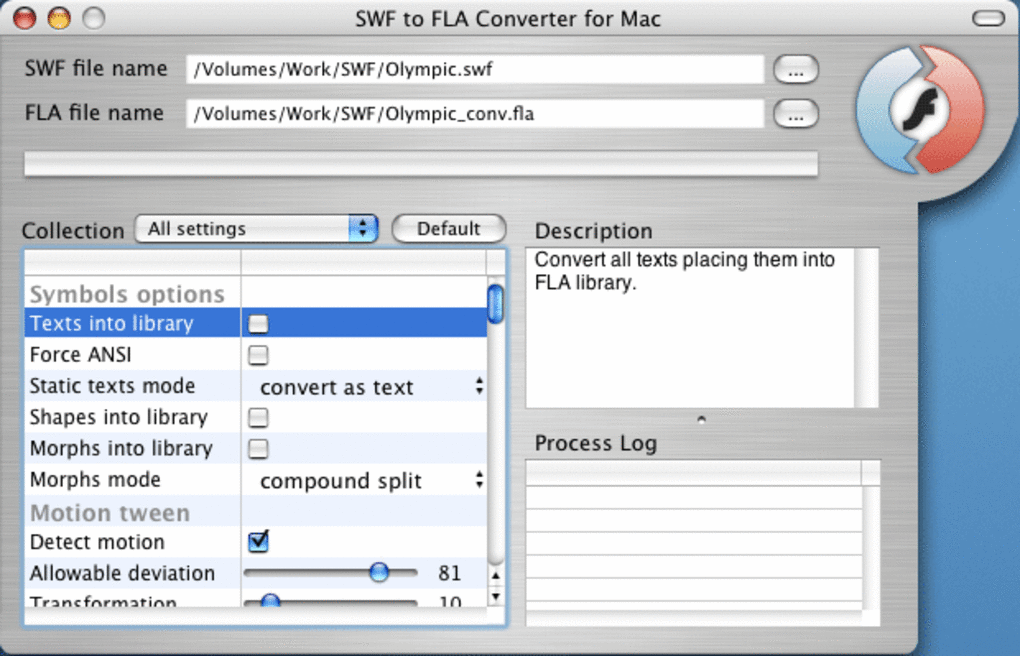
- Launch SWF to FLA Converter from your applications list.
- Click the Add Files button and browse to the SWF file(s) you wish to convert. You can also drag and drop files directly into the main window.
- Choose the output folder where the newly created FLA files will be saved.
- If you need to process multiple files, enable the Batch mode checkbox to queue all selections.
- Press the Convert button. The program will analyze each SWF, extract embedded assets, and generate a matching FLA project.
- When conversion completes, a notification appears. Open the resulting FLA in Adobe Animate to verify layer integrity and make further edits.
Because the software runs locally, no internet connection is required for the actual conversion, ensuring privacy for proprietary animations. The trial version limits conversion to a maximum of three files per session, which is sufficient for evaluation purposes.
Compatibility, Pros & Cons, and Expert Review
Operating System Support
SWF to FLA Converter works on macOS (including OS X 10.6 and later) and Windows (Vista, 7, 8, 10). The application does not require additional runtime libraries, which reduces potential conflicts with other installed software.
Pros
- Fast conversion speed – most files process in under a minute.
- Preserves original layer hierarchy, making post‑conversion editing painless.
- Very low system footprint; ideal for older machines.
- Free trial provides genuine functionality without watermarks.
- Multi‑language UI expands accessibility.
Cons
- Trial version caps the number of conversions per session.
- Last major update was in 2012; may lack support for newer SWF features.
- No built‑in preview of the resulting FLA; users must open Adobe Animate to inspect.
- Limited customer support options for the trial edition.
Overall Rating: 4 out of 5 stars
The SWF to FLA Converter delivers on its core promise: turning compiled Flash files back into editable projects with impressive fidelity. While the trial limitations and dated UI may deter power users, the tool’s speed, minimal resource usage, and reliable layer preservation make it a solid choice for occasional conversion tasks. Educators and hobbyists will find the free version more than adequate for testing legacy animations, and the upgrade path to the full version is transparent.
Frequently Asked Questions
Can SWF to FLA Converter handle encrypted SWF files?
The trial version does not support decryption of protected SWF files. You would need to purchase the full license and provide the appropriate decryption key if the file is legally yours.
Is the converted FLA file fully compatible with the latest Adobe Animate?
Yes, the generated FLA files follow the standard Adobe Animate format, allowing you to open and edit them in the latest version without additional conversion steps.
Does the software require an internet connection to run?
No. All conversion processes are performed locally on your computer, ensuring privacy and offline functionality.
What file size limits are there for the trial version?
The trial version imposes a limit of three conversions per session, but there is no strict size cap on individual SWF files. Extremely large files may take longer to process.
Can I convert SWF files that contain ActionScript 3 code?
The converter extracts visual assets and timeline data, but it does not decompile ActionScript code. You will need a separate ActionScript decompiler if you require the script logic.
Conclusion & Call to Action
SWF to FLA Converter fills a specific but valuable niche: giving users a fast, secure way to revert compiled Flash animations back into editable project files. Its lightweight footprint, straightforward interface, and reliable preservation of layers make it an attractive option for educators, developers, and hobbyists dealing with legacy content. While the trial version limits the number of conversions and lacks support for newer SWF features, the full license unlocks unlimited batch processing and continued updates from Eltima. If you need to recover editable sources from old SWF files without investing in heavyweight decompilers, give the free trial a download today. Should the trial meet your expectations, consider upgrading to the full version to enjoy unrestricted conversions and priority support.
Download SWF to FLA Converter now






